
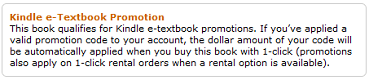
To get FREE $10 Amazon Kindle Textbook Credit Enter the code ETXTBOOK – Your $10 credit will be automatically applied to your account! Not limited to student accounts. When buying a textbook, make sure you see the below image for qualifying books.
You must redeem the credit by 11:59 p.m. PST on January 9, 2012.
You can Also Follow Us On Facebook, Twitter, Pinterest, Instagram and Telegram for 24 hour freebie updates and more!
 FREE 3 Months of Kindle Unlimited Reading
 Thousands of FREE eBooks on Amazon for “Stuff Your Kindle Day”
 FREE Amazon Original Stories BLAZE Kindle Shorts for Prime Members
 80 FREE Kindle eBook Downloads
 81 FREE Kindle eBook Downloads
ETXTBOOK
how do u redeem this ? I entered the code but don’t know how to redeem.
I can’t even find record of $10 being added to my account.
Weird.
I saw the pop up window when I entered the code saying there was $10 in my Kindle but
have searched Amazon and can’t find where that $10 went ?
If you go to an mp3 page (click on one of the free songs or albums) and then look underneath where it says “Give album or song as gift” there is a link that says “Redeem a gift card or promotion code & view balance”. If you click on that you should see what you have for balances in various promotion codes.
It isn’t something I see on etextbook pages, oddly enough.